
Searching Cases by Name
The observed PeachCourt Court Search was a login gate, not an anonymous Sumter result table. It showed Email, Password, Forgot Password, and Register. The research did not verify a public name-field form, so do not invent one. After signing in, select the right county and court before trying the available party controls.
- Open Georgia E-Access and follow its Sumter provider route.
- Sign in or register if PeachCourt still requires an account.
- Select Sumter and the correct court, then enter the party details the live interface permits.
- Compare candidates by case number, filing context, and party role before opening the docket.
- Confirm uncertain matches with the responsible clerk.
| Field Label | Type | Required | Notes |
|---|---|---|---|
| Account text | Yes at observed gate | Used to sign in | |
| Password | Account text | Yes at observed gate | Protected entry |
| County | Search selector | Documented workflow | Select Sumter |
| Court | Search selector | Documented workflow | Select Superior or State |
Sumter PeachCourt Account Access
PeachCourt registration advertises accounts for attorneys and non-attorneys. The form shows name, email, confirmation, password, secret question and answer, reCAPTCHA, and an agreement control.
The captured registration screen documents that access route:
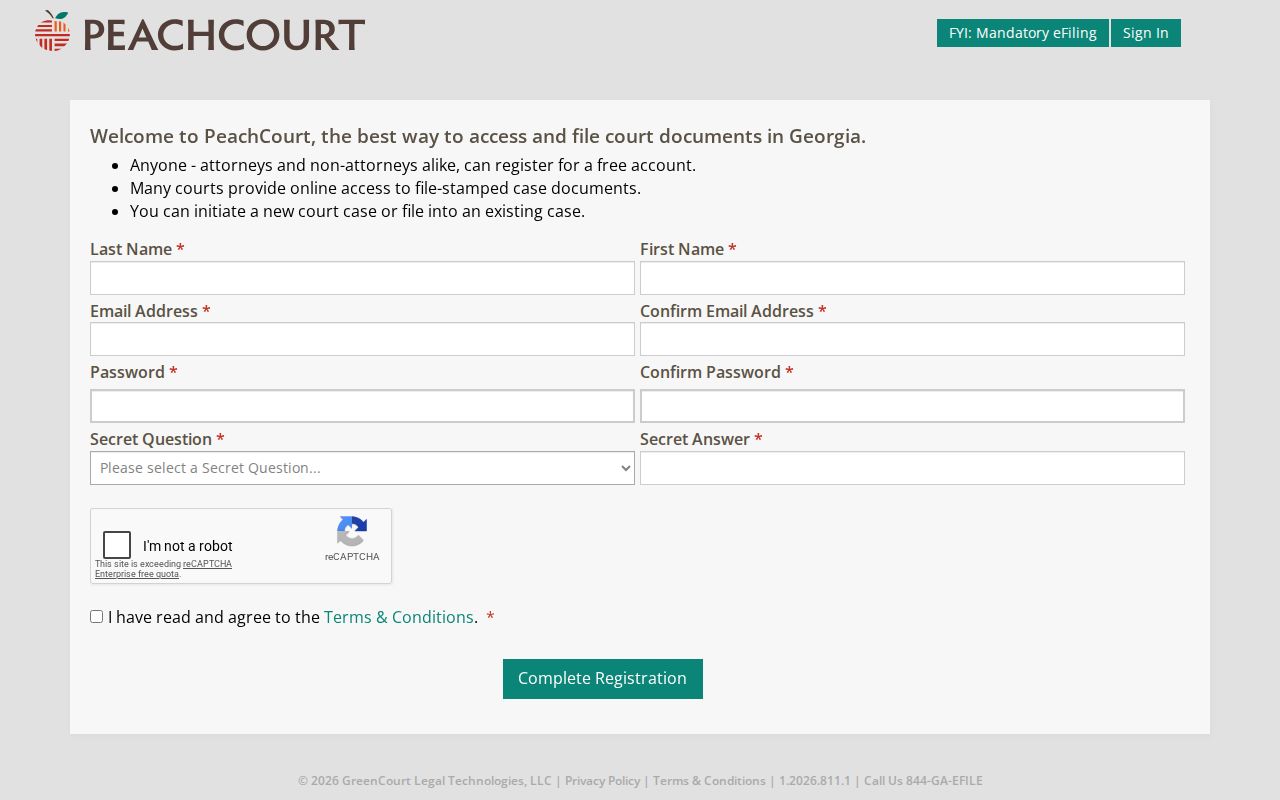
The image shows account creation, not a public case record. Never enter another person’s protected identifiers to test the service.
Searching by Case Number
PeachCourt documentation describes a Cases search by county, court, and exact case number. It also distinguishes a Peach number used for a filing search. The research did not establish a single local printed format that safely supports a made-up example. Enter the identifier exactly as it appears on a Sumter notice or filing, including letters and punctuation.
A case number identifies a court action. A Peach number identifies a filing in the vendor workflow. If one produces no result, do not freely swap them. Ask the clerk which identifier belongs in which field.
Choosing the Sumter Court First
The first search field is venue. Superior Court has general jurisdiction. State Court is separate. Magistrate handles listed small civil and warrant work; Probate handles estates and related records; Juvenile has restricted-access rules; city courts keep city citations.
A search in the wrong system can yield a false no-result. The Sumter County Courts directory is the best routing map when the court is unknown. It is not itself a case database.
What a Case Search Returns
PeachCourt says a criminal case information page may show the judge, status, co-defendants, counsel, charges, disposition and date, calendar events, proceedings, and documents. Availability varies by court. The clerk, not the vendor, remains the official record keeper.
| Case Number | The court action identifier. |
|---|---|
| Parties | Names and roles if public. |
| Case Type | The proceeding category. |
| Events | Calendar and docket activity. |
| Status | The provider’s current status label, to be verified. |
When Sumter Search Shows Nothing
No result means only that nothing matched the system and terms searched. Spelling, duplicate names, aliases, historical limits, court selection, a new filing, or restricted access can explain the gap.
Try the exact number, verify venue and filing date, then call the custodian. Missing document images may require a clerk copy or eCertification. Sealed and adoption documents are excluded from ordinary PeachCourt document examples.
Note: Never label a Sumter case nonexistent solely because one provider returned no match.
Statewide vs County Case Search
Georgia’s E-Access page is a routing layer. For Sumter Superior and State Courts, it points to PeachCourt. There is no separate county-hosted free name-and-number database documented in the research.
| Georgia E-Access | Sumter PeachCourt route |
|---|---|
| Finds state-approved provider links | Handles mapped Superior/State access |
| Routing information | Account-gated case tools |
| Best when provider is unknown | Best for a known Sumter court and number |
E-Filing Is Not Case Searching
The Georgia e-file map identifies PeachCourt as mandatory for listed Sumter Superior and State venues. Sumter Magistrate links eFile Georgia. Those filing systems submit documents; they do not prove that every filed item is open to anonymous viewing.
Search access, document purchase, e-filing, and certification are four different tasks. Use the Sumter County court records route when a docket result leads to a copy request.
Access and Restricted Cases
Georgia Uniform Superior Court Rule 21 begins with a public-access presumption but permits lawful limits and sealing. Juvenile records have separate confidentiality rules. Protected identifiers must be redacted, and adoption or sealed documents may be absent from ordinary online access.
A missing image is not proof of sealing. Ask the clerk whether the item is restricted, not digitized, older, or available only by another lawful route. A person seeking restricted material must follow the court’s process and cannot bypass an order through a broad search.